I just wanted to make a note of this because it is easy to do via the Exchange Management Shell but can become problematic through the EMC, especially with a large number of mailbox databases. Essentially what we are looking to do here is change the default warning and prohibit limits that Exchange uses for user mailboxes.
The following command will change the warning size to 7GB and prohibit users the ability to send messages at 8GB.
And we can double check our handy work through the EMC to make sure that we have these properties adjusted properly.
Everything looks good. I should note that there are a number of other really handy things that can be changed via the set-mailboxdatabse cmdlet and the ability to pipe it through get-mailboxdatabase is fairly straight forward, making global changes to your Exchange environment such as this one much quicker and easier to do. There is some good reading here:
I ran into a few minor glitches that weren’t mentioned in other posts when using this method in my own environment. So first I will mention what was different for me, then I will be going over the full set of instructions to use this method. My goal for this post is to be as thorough and unambiguous as possible so there are no questions after reading these instructions.
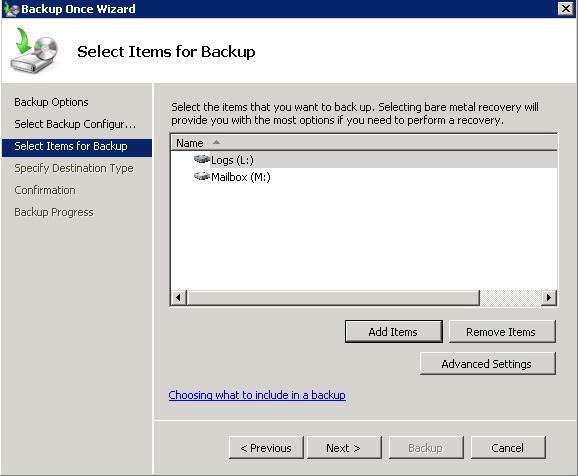
First, it wasn’t readily apparent what specifically needed to be backed up in the pieces I read. Though, it is quite possible I managed to misread the sections that described them. After some experimentation in our test network I learned that all volumes containing databases and log files need to be backed up. This means that if you have separate drives for logs and databases, both of them need to get backed up, I would have saved a lot of time had I known this beforehand. And, as far as I can tell, both the mailbxes and logs have to be backed up for this method to work, not just one or the other. So just to reiterate this with an example, you have to back both the (L:) and (M:) volumes up.
The other thing that was mentioned in other posts but wasn’t clear cut was the need to change the registry key to disable VSS trasnport replication. It is necessary for Exchange environments using a DAG configuration with both active and passive databases, if this change isn’t the case the backup may work but your logs won’t get truncated. Finally, ensure that you have the Microsof Exchange Server Extension for Windows Backup service started.
Log on to the server by using an account that has local administrator access, and open regedit
Navigate to HKEY_LOCAL_MACHINE\Software\Microsoft\ExchangeServer\v14\Replay\Parameters.
Add a new DWORD value named EnableVSSWriter, and set its value to 0.
Exit Registry Editor and then restart the Microsoft Exchange Replication service.
Okay, now we need to enable the Windows Backup feature (I will leave that to the reader), just make sure not to enable the backup command line tools (they are outdated).
So now you just create your backup job and after everything is all said and done your logs should get truncated, it seems like a lot more work than should be necessary but if your logs don’t get truncated then really bad things happen, so it is a small price to pay I guess to make sure things are working the right way.
That’s pretty much it. Once the backup has completed your log volume should have more room. There are other ways to clear the transaction logs, maybe I will go over them in another post but this method is (for the most part once you figure out what you’re doing) easy and built into Windows. Just make sure you have enough free space somewhere on your network to house the backups, especially if there there is a lot to move.
I have a lot of passwords. Like, somewhere in the range of 50 or so for various work stuff, email, home server, websites, etc. I don’t know about anybody else, but I can’t remember that many passwords let alone keep track of which ones change or expire. In this post I will be going over a way to keep passwords centralized in one place, secure and available to me whenever I need them (for the most part). On top of that this is a great way to keep all of your passwords up date easily. Because I am always creating new accounts or changing existing account passwords this is essentially the best way that I have found to do it over the years.
It is a fairly simple idea in practice so let’s get going. You will need a few things first. Download and install Dropbox on any and all of the computers that you will want to view/edit or create username and passwords on. I like Dropbox because it works cross platform so I can sync my folders on a Linux, Android iOS or Mac OS system like I would on a Windows box, which is pretty handy. Oh yeah, and its free.
Next we are going to need to go get a program called KeePassX. This is what actually keeps track of your passwords. This project was spawned originally from KeePass. One very nice feature is that the password database files are compatible across programs so if you don’t like KeePassX you can check out KeePass and everything will just work, and vice versa, going from KeePass to KeePassX. I like this program because like Dropbox it is cross platform, reliable, free (Open Source), has some pretty handy features and is super easy to use.
Ok sweet, now that we have the tools we need it is just a matter of getting up and going. Not a lot of configuration but there are a few steps. The first is to make a home for you password file and your encryption key (if you want to use two factor authentication) inside Dropbox. I made a folder called “keepassx” to put my crypto key, “keepassx” and my password file “passwords.kdb” in there.
But we need to create these files with KeePassX before we can put them in our Dropbox folder. Easy enough, most of these should be pretty much self explanatory so if I miss something let me know.
So this is the screen you get when you open up KeePassX by default. If you already have your password file created just enter your master password and your key file (encryption key) if you created one to open up your password list. If this is the first time opening the program choose a master password and decide if you want to use an encryption key. The encryption key, should you choose to make one, will be one of the files that goes into your Dropbox folder to be synchronized.
NOTE: The password pictured above is your master password and should be chosen carefully. It should be unique, have as many unique characters and as much entropy as possible if you want your password file to be as secure as possible.
Once you have created your password/encryption, the rest is easy. Take a spin, create some password entries, build a few groups whatever you want just so we can get some data into the password database. Then just save your file and choose the path to Dropbox that you chose.
Now from whatever other device you would like to access this from just open KeePassX, enter your password and browse to the location you set for your password file.
I often find myself writing a lot of bash scripts that wrap functionality of my services and programs in ways that make my job easier. While bash doesn’t lend itself well to traditional “inheriting” of program elements, it still is very helpful to build a toolbox of snippets, templates, and bits of script that let me assemble new scripts with tried and true methods to get things done.
One of the hardest things to do well in bash is parsing command line options in a consistent cross platform way. The template below shows an example of how to do this that allows for short, long and positional options.
The template uses getopt to normalize short options after parsing long options in a two pass approach. Using getopt transforms options into their canonical form – for example, the option string “-c foobar -laht -v” after being parsed by getopt, becomes “-c foobar -l -a -h -t -v”, allowing them to be handled more consistently.
The getopt string (stored in the variable “opts” below) consists of all the short option letters, with letters that take an argument (e.g. cmd -a foo) being followed by a colon. So if I had short options “a” and “b”, and “b” took an argument, my getopt string would be “ab:”.
# Option defaults
OPT="value"

# Gets the command name without path
cmd(){ echo `basename $0`; }

# Help command output
usage(){
echo "\
`cmd` [OPTION...]
-f, --flag; Set a flag
-o, --opt; Set an option with argument (default: $OPT)
-v, --verbose; Enable verbose output (include multiple times for more
             ; verbosity, e.g. -vvv)
" | column -t -s ";"
}

# Error message
error(){
    echo "`cmd`: invalid option -- '$1'";
    echo "Try '`cmd` -h' for more information.";
    exit 1;
}

# getopt string
opts="fvo:"

# There's two passes here. The first pass handles the long options and
# any short option that is already in canonical form. The second pass
# uses `getopt` to canonicalize any remaining short options and handle
# them
for pass in 1 2; do
    while [ -n "$1" ]; do
        case $1 in
            --) shift; break;;
            -*) case $1 in
                -f|--flag)     FLAG=1;;
                -o|--opt)      OPT=$2; shift;;
                -v|--verbose)  VERBOSE=$(($VERBOSE + 1));;
                --*)           error $1;;
                -*)            if [ $pass -eq 1 ]; then ARGS="$ARGS $1";
                               else error $1; fi;;
                esac;;
            *)  if [ $pass -eq 1 ]; then ARGS="$ARGS $1";
                else error $1; fi;;
        esac
        shift
    done
    if [ $pass -eq 1 ]; then ARGS=`getopt $opts $ARGS`
        if [ $? != 0 ]; then usage; exit 2; fi; set -- $ARGS
    fi
done

# Handle positional arguments
if [ -n "$*" ]; then
    echo "`cmd`: Extra arguments -- $*"
    echo "Try '`cmd` -h' for more information."
    exit 1
fi

# Set verbosity
if [ "0$VERBOSE" -eq 0 ]; then
    # Default, quiet
elif [ $VERBOSE -eq 1 ]; then
    # Enable log messages
elif [ $VERBOSE -ge 2 ]; then
    # Enable high verbosity
elif [ $VERBOSE -ge 3 ]; then
    # Enable debug verbosity
fi
The other interesting thing is that this template allows for multiple verbose flags (-v, -vv, -vvv, etc.) to specify different levels of verbosity – which can be a very handy thing for debugging a misbehaving script or controlling output from a subcommand.
Have other good tips for bash scripting? Share them in the comments!
So I recently had a specific request at work from a user, which, unless I note somewhere I am sure I will forget. Basically, the requester does not want to grant the ability for users to be able to change the default UI ribbon settings within Outlook 2010 or any other Office 2010 program. The easiest way to explain it is, the user wants to disable the “Customize Ribbon” option as pictured below.
While I don’t know of an exact way to accomplish to “grey out” this option I did find a way to wipe the ability out to adjust these settings within Group Policy. The setting is located in the following location within Group Policy Manager. The setting we are looking for is labeledTurn off user customization via UI.
User Configuration -> Administrative Templates -> Microsoft Office 2010 -> Global Options -> Customize -> Turn off user customization via UI
NOTE that you need to have the Office 2010 Group Policy templates installed on the machine you are attempting to set the policy from (if you have questions just let me know and I can follow up with instructions on how to do this). Here is what the setting looks like:
And here is what the updated Outlook “Customize Ribbon” option looks like: